
Word Wise Project

Overview
WordWise is a vocabulary learning app designed to make language acquisition engaging, efficient, and personalized. With spaced repetition, contextual examples, and interactive quizzes, WordWise helps users build lasting vocabulary skills in a fun and intuitive way.
Problem Statement
Many vocabulary learning apps focus on rote memorization, making it difficult for users to retain and apply new words in real-world contexts. How might we create a vocabulary learning experience that enhances retention, provides contextual meaning, and keeps users engaged?
Research and Discovery
User Interviews
To understand users’ struggles with vocabulary learning I conducted 4 user interviews with students, professionals, and language learners
Key Insights from Research:
- Context Matters: Users remember words better when they see them in sentences or real-life examples
- Engagement is Key: Gamified experiences (quizzes, streaks, rewards) increase motivation
- Personalization Helps: Users prefer adaptive learning paths over one-size-fits-all lessons.
Competitive Analysis
I analyzed Quizlet, Brainscape, and Anki to identify strengths and gaps.
Quizlet

Strengths:
- Clear benefits and features displayed on launch page
- Easy sign-up with Apple/Google/Facebook integration
- AI-powered auto-creation of study materials from notes and textbooks
- Options to connect with school courses or browse general study sets
- Multiple study formats with customizable settings, including read-aloud options
- Social learning features like multiplayer study activities
- Ads are present but not intrusive
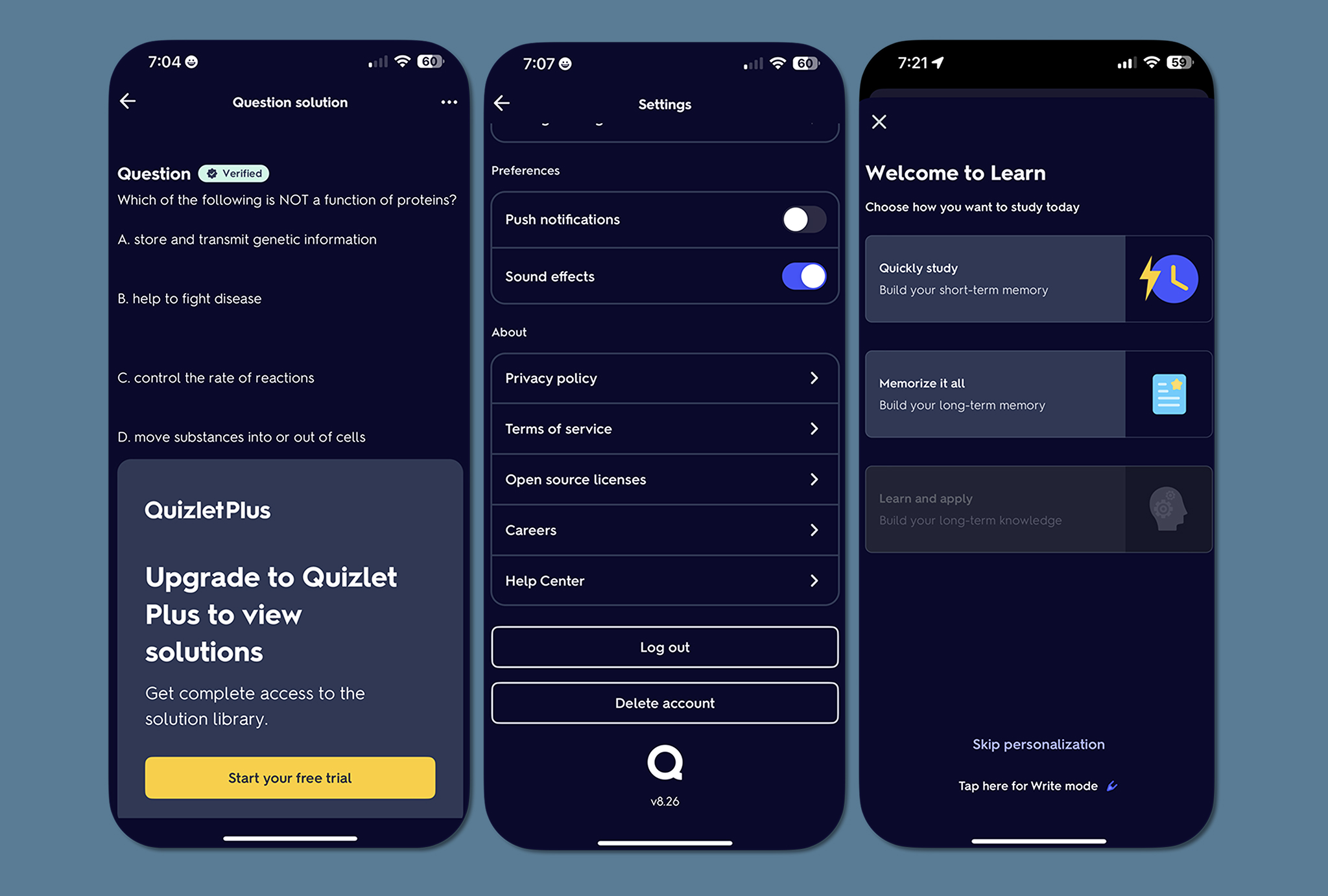
Weaknesses:
- Paid plans are introduced early, despite the app being advertised as free
- No clear onboarding to guide new users
- Interface changes drastically after adding school/course details
- Some features (e.g., Solutions tab, Learn feature) lack clear explanations
- Limited clarity on free vs. paid features outside of sign-up and upgrade screens
- Help Center is hard to find
- Read Aloud speed can’t be adjusted
Brainscape

Strengths:
- Clear benefits and features displayed on launch page
- Quick sign-up with Apple/Google
- Tracks study metrics like time studied and streaks
- Onboarding provided when joining a class
- Supports multimedia on flashcards and text formatting
- Certified flashcards from verified sources
- Users can collaborate with classmates under the Learners tab
- Articles provide study tips and exam prep resources

Weaknesses:
- No onboarding before prompting users to start
- Auto-populated classes on the home screen may feel impersonal
- Account settings are hard to locate
- Many features are locked behind a paywall (e.g., adding media to flashcards)
- Bottom navigation buttons are unlabeled
- Limited study formats—only traditional flashcards
- Users must rate each card before moving on, which slows studying
- No read-aloud feature for accessibility
- Search results lack sorting, making it hard to find relevant content
Anki Pro

Strengths:
- Clear benefits and features listed on launch
- Personalized experience through an initial questionnaire
- Transparent subscription and cancellation instructions
- Supports importing decks from other apps with a guide
- Seamless flashcard creation with text formatting and sharing options
- Text-to-speech available for accessibility
- Offers multiple study modes, including typing answers
- Ability to freeze, move, or delete multiple cards at once

Weaknesses:
- Paid app but not advertised as such in the app store
- No onboarding after the initial questionnaire
- Logging in isn’t prompted or clearly indicated
- Limited pre-populated decks for browsing
- Study directions can obstruct flashcard content
- Must duplicate a deck before studying
- No option to remove the rating feature when reviewing
- Navigation back to the home page is unclear after using multiple features
Ideation and Information Architecture
User Persona
I developed a proto persona based on research to map out a users’ learning journey to identify friction points.

User Goals and Needs
Based on user research, I identified key goals and needs for WordWise users.

User Flows
I designed streamlined user flows with the goal of little friction both when creating flashcard sets and reviewing flashcard sets


Wireframing and Prototyping
I started with hand-drawn sketches and wireframes to explore initial ideas for each task then built low-fidelity prototypes to gain feedback from user testing.


Usability Testing and Insights
I conducted usability testing with 5 participants using my low-fidelity prototype.
Key Observations from Testing:
- Questionnaire is long and users aren’t sure this is needed to create a new account
- Email and password shown on initial splash screen is confusing for new users
- Unclear how to scan physical flashcards after pressing this function
- Unclear how to start study session after choosing flashcard set
- Unclear that “check” and “x” are pressable when reviewing flashcards
- Unclear that user needs to press “tap to reveal” during study session
Iterations Based on Testing
Based on user feedback, I made the following changes to the prototype:
- Condensed questionnaire to one screen by giving ability to scroll
- Hid email and password on initial splash screen
- Added direction to scan physical flashcards with phone camera
- Shifted arrows to be inside preview flashcards
- Made the “check” and “x” look like buttons when reviewing flashcards

Conclusion
WordWise isn’t just about memorizing words—it’s about mastering vocabulary for real-world use. By combining contextual learning, gamification, and personalized study plans, the app empowers users to expand their vocabulary in a meaningful way.
Next Steps
- Conduct further usability testing to refine UI components.
- Usability testing with high-fidelity prototype
- Iterate based on feedback
